¶ How to Issue or Collect a Swipe Card
¶ I'm a member and need a swipe card
Welcome! Thanks so much for joining us. We're a registered charity and a 100% volunteer run group so we don't have any paid staff. This means you'll have to connect with one of our volunteers and organise a time to get a swipe card. The process is simple and only takes about 10 minutes.
The best way to do this is to drop by during our regular Monday open night. You don't need to book, just turn up and ask for someone to help. These usually happen every Monday from 6:30pm but we may be closed on public holidays so check ahead. If you can't make it to the next Monday night, it's best to ask on Discord if someone is available at a different time. If you haven't already, you can join Discord by tapping this link.
Important details for new members:
- bring photo ID - we'll need to check it.
- allow for at least 30 minutes - sometimes our volunteers are busy helping other members.
- expect to complete a brief safety briefing and tour to understand where everything is.
- try to get there earlier in the night as we often have meetings or events happening.
¶ I'm a volunter and need to issue a swipe card
Only the current committee members, or someone they authorise can issue a swipe card and complete new member inductions. If you'd like to help run our new member inductions, please reach out to a member of the committee and ask. Once you've run enough of them under supervision, you'll get access to the member portal as an admin to issue swipe cards.
- Go to the manage members page in the portal under Admin Tools > Members.
- Ask for their full name and email address (or phone) to verify their identity. Do not ask them "is it x", they must say it to you first.
- Let them know the following:
- once you issue a new swipe card, any previous card will stop working straight away;
- if they find a previous card, ask them to cut it up and throw it out so they don't get them mixed up;
- advise them not to mark it with anything that lets a passerby easily work out they can use it at BMS (e.g. avoid putting our address or name on it).
- remind them that if they lose it, they must tell a member of the committee or post in Discord immediately so it can be deactivated and they will be held responsible for anyone who uses it.
- Replace (or add) the card number to the RFID Card field on their profile page.
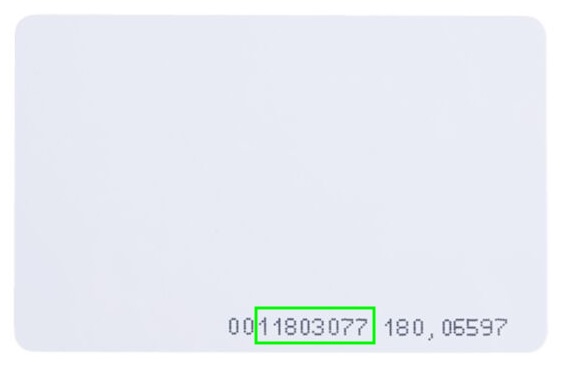
- the card number is the left most block of numbers with leading 0s removed.
- for example, this card has a card number of
11803077
- Make them swipe it on a real card reader (e.g. the front door) and check that it works. This verifies you typed it correctly and that the card isn't faulty. If it doesn't work and there are no logs posted to Discord, check the card number or try a different card.
FAQ: Can I use my phone or existing swipe card?
A: Short answer is no. Your phone is not compatible with the 125kHz frequency our system uses. It's also unlikely your existing card will work unless it has a card number printed on it in the same format as above (you can try if it does!). We are happy to try our best to make it work for unique cases like implanted RFID chips, etc. just reach out to the infrastructure group if you need help.